
GridView Datatable using Session
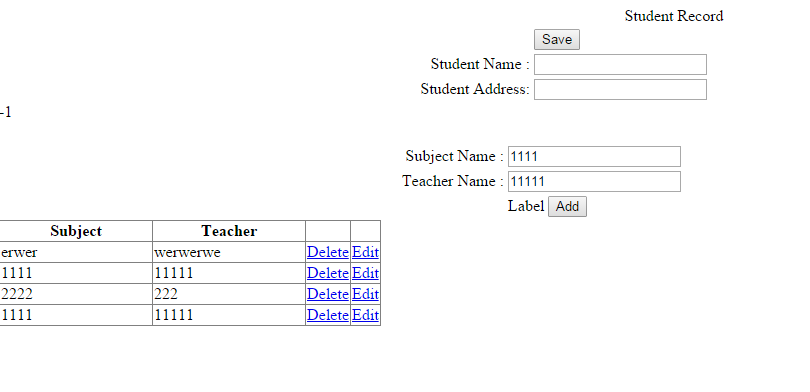
<%@ Page Language="vb" AutoEventWireup="false" CodeBehind="Index.aspx.vb" Inherits="WebApplication11.Index" %>
<!DOCTYPE html PUBLIC "-//W3C//DTD XHTML 1.0 Transitional//EN" "http://www.w3.org/TR/xhtml1/DTD/xhtml1-transitional.dtd">
<html xmlns="http://www.w3.org/1999/xhtml">
<head runat="server">
<title></title>
<style type="text/css">
.style1
{
width: 100%;
}
</style>
</head>
<body>
<form id="form1" runat="server">
<div>
<table class="style1">
<tr>
<td colspan="4" align="center">
Student Record</td>
</tr>
<tr>
<td>
</td>
<td>
</td>
<td>
<asp:Button ID="btnsave" runat="server" Text="Save" />
</td>
<td>
</td>
</tr>
<tr>
<td>
</td>
<td align="right">
Student Name :</td>
<td>
<asp:TextBox ID="txtSname" runat="server"></asp:TextBox>
</td>
<td>
</td>
</tr>
<tr>
<td>
</td>
<td align="right">
Student Address:</td>
<td>
<asp:TextBox ID="txtAddress" runat="server"></asp:TextBox>
</td>
<td>
</td>
</tr>
</table>
</div>
<table class="style1">
<tr>
<td>
</td>
<td>
</td>
</tr>
<tr>
<td align="right">
Subject Name :</td>
<td>
<asp:TextBox ID="txtSubjectname" runat="server"></asp:TextBox>
</td>
</tr>
<tr>
<td align="right">
Teacher Name :</td>
<td>
<asp:TextBox ID="txtTeacher" runat="server"></asp:TextBox>
</td>
</tr>
<tr>
<td>
</td>
<asp:Label ID="Label2" runat="server" Text="Label"></asp:Label>
<td>
<asp:Label ID="Label1" runat="server" Text="Label"></asp:Label>
<asp:Button ID="btnadd" runat="server" Text="Add" />
</td>
</tr>
</table>
<asp:GridView ID="GridView1" runat="server" AutoGenerateColumns="false" OnRowDeleting="Gridview1_RowDeleting" >
<Columns>
<asp:BoundField DataField="Subject" HeaderText="Subject" ItemStyle-Width="150" />
<asp:BoundField DataField="Teacher" HeaderText="Teacher" ItemStyle-Width="150" />
<asp:TemplateField>
<ItemTemplate>
<asp:LinkButton ID="lnkdelete" runat="server" CommandName="Delete" >Delete</asp:LinkButton>
</ItemTemplate>
</asp:TemplateField>
<asp:TemplateField>
<ItemTemplate>
<asp:LinkButton ID="lnkEdit" runat="server" CommandName="Select" >Edit</asp:LinkButton>
</ItemTemplate>
</asp:TemplateField>
<%-- <asp:TemplateField>
<ItemTemplate>
<asp:LinkButton ID="LinkButton4" Text="Delete" runat="server" OnClick="OnDelete" />
</ItemTemplate>
</asp:TemplateField>--%>
</Columns>
</asp:GridView>
</form>
</body>
</html>
 Imports System.Data.SqlClient
 Public Class Index
   Inherits System.Web.UI.Page
   Public strConnectionString As String = ConfigurationManager.ConnectionStrings("DBstudent").ConnectionString
   Public objConnection As New SqlConnection(strConnectionString)
   Dim qry As String = ""
   Protected Sub Page_Load(ByVal sender As Object, ByVal e As System.EventArgs) Handles Me.Load
     If Not IsPostBack Then
       Dim myDataTable As New DataTable()
       myDataTable = CreateDataTable()
       Session("myDatatable") = myDataTable
       Label2.Text = "-1"
     End If
   End Sub
   Protected Sub btnadd_Click(ByVal sender As Object, ByVal e As EventArgs) Handles btnadd.Click
     AddDataToTable(Label2.Text, txtSubjectname.Text.Trim(), txtTeacher.Text.Trim(), DirectCast(Session("myDatatable"), DataTable))
     Me.GridView1.DataSource = DirectCast(Session("myDatatable"), DataTable).DefaultView
     Me.GridView1.DataBind()
   End Sub
   Private Sub AddDataToTable(ByVal indexid As String, ByVal firstname As String, ByVal lastname As String, ByVal myTable As DataTable)
     If Convert.ToDouble(indexid) > 0 Then
       myTable.Rows(indexid)("Subject") = firstname
       myTable.Rows(indexid)("Teacher") = lastname
       Label2.Text = "-1"
     Else
       Dim row As DataRow
       row = myTable.NewRow()
       row("Sdtid") = 0
       row("Stid") = 0
       row("Subject") = firstname
       row("Teacher") = lastname
       myTable.Rows.Add(row)
     End If
   End Sub
   Private Function CreateDataTable() As DataTable
     Dim dt As New DataTable()
     dt.Columns.AddRange(New DataColumn() {New DataColumn("Sdtid", GetType(Integer)),
                        New DataColumn("Stid", GetType(Integer)),
                         New DataColumn("Subject", GetType(String)),
                         New DataColumn("Teacher", GetType(String))})
     Return dt
   End Function
   Protected Sub Gridview1_RowDeleting(ByVal sender As Object, ByVal e As GridViewDeleteEventArgs)
     Dim dt As DataTable = DirectCast(Session("myDatatable"), DataTable)
     dt.Rows.Remove(dt.Rows(e.RowIndex))
     Session("myDatatable") = dt
     Me.GridView1.DataSource = DirectCast(Session("myDatatable"), DataTable).DefaultView
     Me.GridView1.DataBind()
   End Sub
   'Protected Sub OnDelete(ByVal sender As Object, ByVal e As EventArgs)
   '  Dim row As GridViewRow = GridView1.Rows(Index)
   '  'Dim row As GridViewRow = TryCast(TryCast(sender, LinkButton).NamingContainer, GridViewRow)
   '  Dim dt As DataTable = DirectCast(Session("myDatatable"), DataTable)
   '  dt.Rows.Remove(dt.Rows(row.RowIndex))
   '  Session("myDatatable") = dt
   '  Me.GridView1.DataSource = DirectCast(Session("myDatatable"), DataTable).DefaultView
   '  Me.GridView1.DataBind()
   'End Sub
   'Protected Sub GridView1_RowEditing(ByVal sender As Object, ByVal e As System.Web.UI.WebControls.GridViewEditEventArgs) Handles GridView1.RowEditing
   '  GridView1.EditIndex = e.NewEditIndex
   '  Label1.Text = e.NewEditIndex
   '  Dim dt As DataTable = DirectCast(Session("myDatatable"), DataTable)
   '  Dim dr As DataRow = dt.Rows(Label1.Text)
   '  txtSubjectname.Text = dr("Subject")
   '  txtTeacher.Text = dr("Teacher")
   'End Sub
   Protected Sub btnsave_Click(ByVal sender As Object, ByVal e As EventArgs) Handles btnsave.Click
     qry = " Insert into StudentMain (Sname,SAddress) Values ('" & txtSname.Text & "' ,'" & txtAddress.Text & "') ;select @@IDentity as myID;"
     Dim i As Integer = ExecuteScalar(qry)
     Dim dt As DataTable = DirectCast(Session("myDatatable"), DataTable)
     For Each dr As DataRow In dt.Rows
       qry = " insert into StudentDetail (Stid,Subject,Teacher) Values (" & i & ",'" & dr("Subject") & "' ,'" & dr("Teacher") & "')"
       ExecuteNonQuery(qry)
     Next
   End Sub
   Public Function ExecuteScalar(ByVal SqlString As String) As String
     Dim str As String = ""
     Dim dbcmd As New SqlCommand(SqlString, objConnection)
     Try
       dbcmd.Connection.Open()
       str = dbcmd.ExecuteScalar()
     Catch ex As SqlClient.SqlException
       Throw ex
     Finally
       dbcmd.Connection.Close()
     End Try
     Return str
   End Function
   Public Sub ExecuteNonQuery(ByVal SqlString As String)
     Dim dbcmd As New SqlCommand(SqlString, objConnection)
     Try
       dbcmd.Connection.Open()
       dbcmd.CommandTimeout = 0
       dbcmd.ExecuteNonQuery()
     Catch ex As SqlClient.SqlException
       Throw ex
     Finally
       dbcmd.Connection.Close()
     End Try
   End Sub
   'Protected Sub GridView1_RowEditing(ByVal sender As Object, ByVal e As GridViewDeleteEventArgs)
   '  Dim row As GridViewRow = GridView1.Rows(e.RowIndex)
   '  Label2.Text = row.RowIndex
   '  '  'Dim row As GridViewRow = TryCast(TryCast(sender, LinkButton).NamingContainer, GridViewRow)
   'End Sub
   'Protected Sub GridView1_RowEditing(ByVal sender As Object, ByVal e As System.Web.UI.WebControls.GridViewEditEventArgs) Handles GridView1.RowEditing
   '  Dim row As GridViewRow = GridView1.Rows(e.NewEditIndex)
   '  Label2.Text = row.RowIndex
   'End Sub
   'Protected Sub GridView1_RowSelecting(ByVal sender As Object, ByVal e As EventArgs)
   '  Dim row As GridViewRow = GridView1.Rows(e.ne)
   'End Sub
   Protected Sub GridView1_RowSelecting(ByVal sender As Object, ByVal e As System.Web.UI.WebControls.GridViewSelectEventArgs) Handles GridView1.SelectedIndexChanging
     Dim row As GridViewRow = GridView1.Rows(e.NewSelectedIndex)
     Label2.Text = row.RowIndex
     Dim dt As DataTable = DirectCast(Session("myDatatable"), DataTable)
     Dim dr As DataRow = dt.Rows(Label2.Text)
     txtSubjectname.Text = dr("Subject")
     txtTeacher.Text = dr("Teacher")
   End Sub
 End Class
Dynamic Gridview

Create db
USE [Customerinfo]
GO
SET ANSI_NULLS ON
GO
SET QUOTED_IDENTIFIER ON
GO
CREATE TABLE [dbo].[customers](
[CustomerID] [int] IDENTITY(1,1) NOT NULL,
[ContactName] [nvarchar](50) NULL,
[CompanyName] [nvarchar](50) NULL,
CONSTRAINT [PK_customers] PRIMARY KEY CLUSTERED
(
[CustomerID] ASC
)WITH (PAD_INDEX = OFF, STATISTICS_NORECOMPUTE = OFF, IGNORE_DUP_KEY = OFF, ALLOW_ROW_LOCKS = ON, ALLOW_PAGE_LOCKS = ON) ON [PRIMARY]
) ON [PRIMARY]
GO
Datagrid.aspx.cs
<%@ Page Language="C#" AutoEventWireup="true" CodeBehind="Datagrid.aspx.cs" Inherits="Gridview.Datagrid" %>
<!DOCTYPE html PUBLIC "-//W3C//DTD XHTML 1.0 Transitional//EN" "http://www.w3.org/TR/xhtml1/DTD/xhtml1-transitional.dtd">
<html xmlns="http://www.w3.org/1999/xhtml">
<head runat="server">
<title></title>
</head>
<body>
<form id="form1" runat="server">
<asp:ScriptManager ID="ScriptManager1" runat="server">
</asp:ScriptManager>
<div id = "dvGrid" style ="padding:10px;width:550px">
<asp:UpdatePanel ID="UpdatePanel1" runat="server">
<ContentTemplate>
<asp:GridView ID="GridView1" runat="server" Width = "550px"
AutoGenerateColumns = "false" Font-Names = "Arial"
Font-Size = "11pt" AlternatingRowStyle-BackColor = "#C2D69B"
HeaderStyle-BackColor = "green" AllowPaging ="true" ShowFooter = "true"
OnPageIndexChanging = "OnPaging" onrowediting="EditCustomer"
onrowupdating="UpdateCustomer" onrowcancelingedit="CancelEdit"
PageSize = "10" >
<Columns>
<asp:TemplateField ItemStyle-Width = "30px" HeaderText = "CustomerID">
<ItemTemplate>
<asp:Label ID="lblCustomerID" runat="server"
Text='<%# Eval("CustomerID")%>'></asp:Label>
</ItemTemplate>
<FooterTemplate>
<asp:TextBox ID="txtCustomerID" Width = "40px"
MaxLength = "5" runat="server"></asp:TextBox>
</FooterTemplate>
</asp:TemplateField>
<asp:TemplateField ItemStyle-Width = "100px" HeaderText = "Name">
<ItemTemplate>
<asp:Label ID="lblContactName" runat="server"
Text='<%# Eval("ContactName")%>'></asp:Label>
</ItemTemplate>
<EditItemTemplate>
<asp:TextBox ID="txtContactName" runat="server"
Text='<%# Eval("ContactName")%>'></asp:TextBox>
</EditItemTemplate>
<FooterTemplate>
<asp:TextBox ID="txtContactName" runat="server"></asp:TextBox>
</FooterTemplate>
</asp:TemplateField>
<asp:TemplateField ItemStyle-Width = "150px" HeaderText = "Company">
<ItemTemplate>
<asp:Label ID="lblCompany" runat="server"
Text='<%# Eval("CompanyName")%>'></asp:Label>
</ItemTemplate>
<EditItemTemplate>
<asp:TextBox ID="txtCompany" runat="server"
Text='<%# Eval("CompanyName")%>'></asp:TextBox>
</EditItemTemplate>
<FooterTemplate>
<asp:TextBox ID="txtCompany" runat="server"></asp:TextBox>
</FooterTemplate>
</asp:TemplateField>
<asp:TemplateField>
<ItemTemplate>
<asp:LinkButton ID="lnkRemove" runat="server"
CommandArgument = '<%# Eval("CustomerID")%>'
OnClientClick = "return confirm('Do you want to delete?')"
Text = "Delete" OnClick = "DeleteCustomer"></asp:LinkButton>
</ItemTemplate>
<FooterTemplate>
<asp:Button ID="btnAdd" runat="server" Text="Add"
OnClick = "AddNewCustomer" />
</FooterTemplate>
</asp:TemplateField>
<asp:CommandField ShowEditButton="True" />
</Columns>
<AlternatingRowStyle BackColor="#C2D69B" />
</asp:GridView>
</ContentTemplate>
<Triggers>
<asp:AsyncPostBackTrigger ControlID = "GridView1" />
</Triggers>
</asp:UpdatePanel>
</div>
</form>
</body>
</html>
Gridview.aspx.cs using c#
using System;
using System.Collections.Generic;
using System.Linq;
using System.Web;
using System.Web.UI;
using System.Web.UI.WebControls;
using System.Data;
using System.Data.SqlClient;
using System.Configuration;
using System.IO.Compression;
namespace Gridview
{
public partial class Datagrid : System.Web.UI.Page
{
private String strConnString = ConfigurationManager.ConnectionStrings["conString"].ConnectionString;
protected void Page_Load(object sender, EventArgs e)
{
if (!IsPostBack)
{
BindData();
}
}
private void BindData()
{
string strQuery = "select CustomerID,ContactName,CompanyName" +
" from customers";
SqlCommand cmd = new SqlCommand(strQuery);
GridView1.DataSource = GetData(cmd);
GridView1.DataBind();
}
private DataTable GetData(SqlCommand cmd)
{
DataTable dt = new DataTable();
SqlConnection con = new SqlConnection(strConnString);
SqlDataAdapter sda = new SqlDataAdapter();
cmd.CommandType = CommandType.Text;
cmd.Connection = con;
con.Open();
sda.SelectCommand = cmd;
sda.Fill(dt);
return dt;
}
protected void AddNewCustomer(object sender, EventArgs e)
{
string CustomerID = ((TextBox)GridView1.FooterRow.FindControl("txtCustomerID")).Text;
string Name = ((TextBox)GridView1.FooterRow.FindControl("txtContactName")).Text;
string Company = ((TextBox)GridView1.FooterRow.FindControl("txtCompany")).Text;
SqlConnection con = new SqlConnection(strConnString);
SqlCommand cmd = new SqlCommand();
cmd.CommandType = CommandType.Text;
cmd.CommandText = "insert into customers( ContactName, CompanyName) " +
"values( @ContactName, @CompanyName);" +
"select CustomerID,ContactName,CompanyName from customers";
cmd.Parameters.Add("@CustomerID", SqlDbType.VarChar).Value = CustomerID;
cmd.Parameters.Add("@ContactName", SqlDbType.VarChar).Value = Name;
cmd.Parameters.Add("@CompanyName", SqlDbType.VarChar).Value = Company;
GridView1.DataSource = GetData(cmd);
GridView1.DataBind();
}
protected void EditCustomer(object sender, GridViewEditEventArgs e)
{
GridView1.EditIndex = e.NewEditIndex;
BindData();
}
protected void CancelEdit(object sender, GridViewCancelEditEventArgs e)
{
GridView1.EditIndex = -1;
BindData();
}
protected void UpdateCustomer(object sender, GridViewUpdateEventArgs e)
{
string CustomerID = ((Label)GridView1.Rows[e.RowIndex]
.FindControl("lblCustomerID")).Text;
string Name = ((TextBox)GridView1.Rows[e.RowIndex]
.FindControl("txtContactName")).Text;
string Company = ((TextBox)GridView1.Rows[e.RowIndex]
.FindControl("txtCompany")).Text;
SqlConnection con = new SqlConnection(strConnString);
SqlCommand cmd = new SqlCommand();
cmd.CommandType = CommandType.Text;
cmd.CommandText = "update customers set ContactName=@ContactName," +
"CompanyName=@CompanyName where CustomerID=@CustomerID;" +
"select CustomerID,ContactName,CompanyName from customers";
cmd.Parameters.Add("@CustomerID", SqlDbType.VarChar).Value = CustomerID;
cmd.Parameters.Add("@ContactName", SqlDbType.VarChar).Value = Name;
cmd.Parameters.Add("@CompanyName", SqlDbType.VarChar).Value = Company;
GridView1.EditIndex = -1;
GridView1.DataSource = GetData(cmd);
GridView1.DataBind();
}
protected void DeleteCustomer(object sender, EventArgs e)
{
LinkButton lnkRemove = (LinkButton)sender;
SqlConnection con = new SqlConnection(strConnString);
SqlCommand cmd = new SqlCommand();
cmd.CommandType = CommandType.Text;
cmd.CommandText = "delete from customers where " +
"CustomerID=@CustomerID;" +
"select CustomerID,ContactName,CompanyName from customers";
cmd.Parameters.Add("@CustomerID", SqlDbType.VarChar).Value
= lnkRemove.CommandArgument;
GridView1.DataSource = GetData(cmd);
GridView1.DataBind();
}
protected void OnPaging(object sender, GridViewPageEventArgs e)
{
BindData();
GridView1.PageIndex = e.NewPageIndex;
GridView1.DataBind();
}
}
}
Gridview.aspx.cs using vb
Imports System.Data
Imports System.Data.SqlClient
Imports System.Collections
Partial Class Gridview
Inherits System.Web.UI.Page
Private strConnString As String = ConfigurationManager.ConnectionStrings("conString").ConnectionString
Protected Sub Page_Load(ByVal sender As Object, ByVal e As EventArgs) Handles Me.Load
If Not IsPostBack Then
BindData()
End If
End Sub
Private Sub BindData()
Dim strQuery As String = "select CustomerID,ContactName,CompanyName" & _
" from customers"
Dim cmd As New SqlCommand(strQuery)
GridView1.DataSource = GetData(cmd)
GridView1.DataBind()
End Sub
Private Function GetData(ByVal cmd As SqlCommand) As DataTable
Dim dt As New DataTable()
Dim con As New SqlConnection(strConnString)
Dim sda As New SqlDataAdapter()
cmd.CommandType = CommandType.Text
cmd.Connection = con
con.Open()
sda.SelectCommand = cmd
sda.Fill(dt)
Return dt
End Function
Protected Sub OnPaging(ByVal sender As Object, ByVal e As GridViewPageEventArgs)
BindData()
GridView1.PageIndex = e.NewPageIndex
GridView1.DataBind()
End Sub
Protected Sub AddNewCustomer(ByVal sender As Object, ByVal e As EventArgs)
Dim CustomerID As String = DirectCast(GridView1.FooterRow _
.FindControl("txtCustomerID"), TextBox).Text
Dim Name As String = DirectCast(GridView1 _
.FooterRow.FindControl("txtContactName"), TextBox).Text
Dim Company As String = DirectCast(GridView1 _
.FooterRow.FindControl("txtCompany"), TextBox).Text
Dim con As New SqlConnection(strConnString)
Dim cmd As New SqlCommand()
cmd.CommandType = CommandType.Text
cmd.CommandText = "insert into customers(ContactName, " & _
"CompanyName) values(@ContactName, @CompanyName);" & _
"select CustomerID,ContactName,CompanyName from customers"
cmd.Parameters.Add("@ContactName", SqlDbType.VarChar).Value = Name
cmd.Parameters.Add("@CompanyName", SqlDbType.VarChar).Value = Company
GridView1.DataSource = GetData(cmd)
GridView1.DataBind()
End Sub
Protected Sub DeleteCustomer(ByVal sender As Object, ByVal e As EventArgs)
Dim lnkRemove As LinkButton = DirectCast(sender, LinkButton)
Dim con As New SqlConnection(strConnString)
Dim cmd As New SqlCommand()
cmd.CommandType = CommandType.Text
cmd.CommandText = "delete from customers where " & _
"CustomerID=@CustomerID;" & _
"select CustomerID,ContactName,CompanyName from customers"
cmd.Parameters.Add("@CustomerID", SqlDbType.VarChar).Value _
= lnkRemove.CommandArgument
GridView1.DataSource = GetData(cmd)
GridView1.DataBind()
End Sub
Protected Sub EditCustomer(ByVal sender As Object, ByVal e As GridViewEditEventArgs)
GridView1.EditIndex = e.NewEditIndex
BindData()
End Sub
Protected Sub CancelEdit(ByVal sender As Object, ByVal e As GridViewCancelEditEventArgs)
GridView1.EditIndex = -1
BindData()
End Sub
Protected Sub UpdateCustomer(ByVal sender As Object, ByVal e As GridViewUpdateEventArgs)
Dim CustomerID As String = DirectCast(GridView1.Rows(e.RowIndex) _
.FindControl("lblCustomerID"), Label).Text
Dim Name As String = DirectCast(GridView1.Rows(e.RowIndex) _
.FindControl("txtContactName"), TextBox).Text
Dim Company As String = DirectCast(GridView1.Rows(e.RowIndex) _
.FindControl("txtCompany"), TextBox).Text
Dim con As New SqlConnection(strConnString)
Dim cmd As New SqlCommand()
cmd.CommandType = CommandType.Text
cmd.CommandText = "update customers set ContactName=@ContactName," _
& "CompanyName=@CompanyName where CustomerID=@CustomerID;" _
& "select CustomerID,ContactName,CompanyName from customers"
cmd.Parameters.Add("@CustomerID", SqlDbType.VarChar).Value = CustomerID
cmd.Parameters.Add("@ContactName", SqlDbType.VarChar).Value = Name
cmd.Parameters.Add("@CompanyName", SqlDbType.VarChar).Value = Company
GridView1.EditIndex = -1
GridView1.DataSource = GetData(cmd)
GridView1.DataBind()
End Sub
End Class
Subscribe to:
Posts
(
Atom
)


